
What an attacker gets, and what you left open
tl;dr
A compromised server isn't just a lost server — it's your GitHub key, your company's code, and logs they can erase. Scan your own droplet and you'll find a port you didn't mean to leave open.
Your auth.log after a day online is the argument. Failed logins, invalid
usernames, the same handful of guesses over and over. The moment a machine is
reachable, it is being scanned. Nobody chose you.
What they actually get
The obvious answers first: bandwidth, and a bot to attack other infrastructure with.
Then the one people miss. Your server has an SSH key for GitHub. Take the server and you can reach the repositories that key opens — which, if it's a work machine, is your company's code. One unsecured droplet, an entire codebase.
Three defences, and you've already done the first:
- SSH keys, never passwords. Done.
- A firewall — say what may reach you and refuse the rest.
- Keep software patched. Unpatched systems are one of the largest sources of breaches. WordPress installs get taken constantly, and the fix was always just running the update.
Ports, and why they exist
A port is a communication endpoint mapped to a process. Without them we'd have burned through IP addresses far faster — ports are what let one address host thousands of services.
The well-known ones live in a file you can read:
less /etc/services
22 SSH, 21 FTP, 23 telnet, 80 HTTP, 443 HTTPS. You can use them, but
you'll get a collision — which is exactly why development conventions settled on
3000 and 8080.
Look at your own server
sudo apt install nmap
nmap YOUR.DROPLET.IP
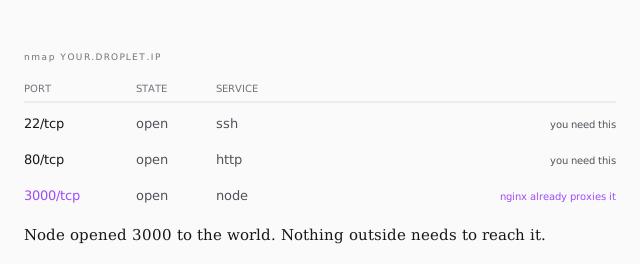
22 and 80 you need. 3000 you don't. Node opened it when it started
listening, and nginx already proxies to it internally over 127.0.0.1. Nothing
on the internet has any reason to reach it directly, and leaving it open means
your app is exposed without any of nginx's protection in front.
That's the port to close, and the next lesson closes it.