
What a server is, and writing one in Node
tl;dr
A server is just a computer that answers requests — there is nothing magical about it. Eight lines of Node prove it, and the interesting part is what those lines say about heads, bodies and streams.
Ask a room what a server is and you get a version of the same answer: a computer that serves requests. That's it. Anything can be a server — your phone, your laptop — if you make it respond to formatted requests.
What we mean by "server" is a set of expectations layered on top:
- Dedicated hardware. Server chips cost thousands and use different chipsets, built for virtualization and efficiency rather than for you.
- Available 100% of the time. This is the real constraint, and it's the one your laptop fails the moment you close the lid.
Eight lines
const http = require("http")
const fs = require("fs")
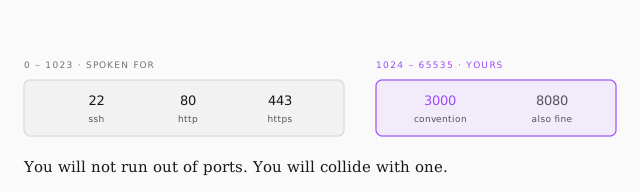
const PORT = 3000

const server = http.createServer(function (req, res) {
    res.writeHead(200, { "content-type": "text/html" })
    fs.createReadStream("index.html").pipe(res)
})
server.listen(PORT)
console.log(`Server started on port ${PORT}`)
No npm install. Both http and fs ship with Node.
Every server, in any language — Node, Django, Flask, Rails, Tomcat — is built around the same two objects: a request coming in, and a response going back. Once you see that, framework differences get much smaller.
What actually goes back
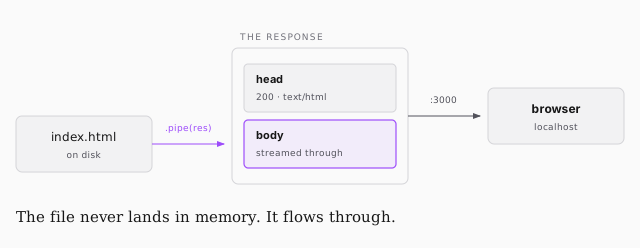
writeHead(200, ...) sets the status and tells the browser what's coming. Being
explicit about content-type is politeness — browsers can often infer it, but
guessing is not a plan.
Then createReadStream('index.html').pipe(res). This is the line worth pausing
on. Without streams you'd read the whole file into memory, hand it to the server,
and only then send it. With a stream you start at the head of the file and pipe
it straight through. On a 1 KB file that's irrelevant; on a large one it's the
difference between fine and falling over.
Making it run
vi index.html          # "hello world" is enough — browsers are forgiving
brew install node      # Homebrew is the package manager for macOS
node simpleServer.js
Then open localhost:3000.
localhost is a shortcut for 127.0.0.1, a reserved loopback address every
computer has — it means look at the open ports on this machine. 192.168.0.1
is another well-known one; it's usually your router.
The HTML file can be a single unclosed line of text and it will still render. Browsers are the most forgiving software on the planet: unknown tags are simply ignored.
And then the catch
You now have a working server that dies when you close your laptop. That's the whole reason the next lesson exists.