
Version control, and getting off the server
tl;dr
Put the repo on GitHub so you can stop editing over SSH. A second SSH key, an `~/.ssh/config` entry, and the four commands that get you unstuck when it doesn't work.
Two facts before the useful part, because they close loops from earlier sections. Git identifies everything by SHA-1 hash — the same hashing you just spent a section on, showing up in the tool you use daily. And git and Linux were both written by Linus Torvalds, which is a remarkable output for one career.
The point of this step
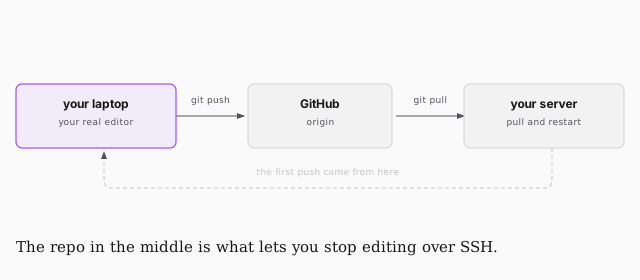
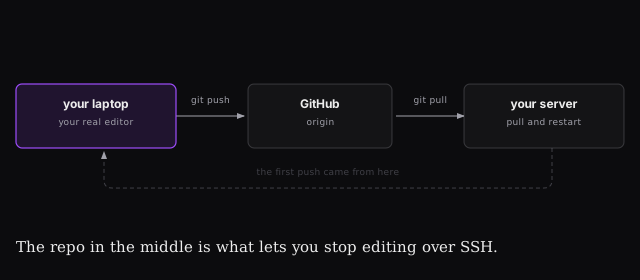
Right now every change to your app means vi over SSH. That's fine for one
config file and miserable for actual work.
Setting it up
Your server needs its own key for GitHub — same tool, new key:
cd ~                              # not inside the repo
ssh-keygen                        # name it gh_key
Copy the public half (gh_key.pub) into GitHub under Settings → SSH and
GPG keys. Same move as DigitalOcean.
Then point your server at the repo and tell SSH which key to use for GitHub:
git remote add origin git@github.com:you/your-repo.git
vi ~/.ssh/config
Host github.com
  HostName github.com
  IdentityFile ~/.ssh/gh_key
git push origin main
When it doesn't work
ssh -Tv git@github.com | test the connection and print everything SSH is doing |
:w !sudo tee % | save a read-only file you opened in vim without sudo |
pkill node | kill a process that won't die from Ctrl+C |
The first one is the one that saves you. Permission denied (publickey) tells
you nothing on its own; -Tv tells you which key was offered and why it was
refused.
The second is the fix for the trap from the nginx lesson: tee reads standard
in and writes standard out, % is the current filename, so you're opening a
privileged process to write the buffer you already edited. Most people alias it.
pkill is the one you'll actually use most often — some process eating memory
that you can't trace back to a terminal.
What this unlocks
Clone the repo on your laptop, work in your real editor, push, then pull on the server. The server becomes somewhere you deploy to rather than somewhere you write in.
Which is a decent place to stop. You bought a domain, bought a server, hardened it, put nginx in front of a Node app, and kept it alive across reboots — all by hand, all understood. Everything after this is refinement.