
Shells, and what they actually do
tl;dr
The shell interprets what you type into something the OS understands. It reads its config once at startup — which is why your edit does nothing until you `source` it.
The terminal is the window. The shell is the program running inside it, and its job is translation: it takes what you typed and turns it into something the operating system can act on.
bash and zsh
zsh | a more extensible bash | ~/.zshrc |
bash | the Bourne again shell | ~/.bash_profile |
A modern Mac gives you zsh. bash is the default you'll find on essentially
every Unix-based system. They're close enough to be interchangeable for
everything in this course.
Two ways to check which one you're in:
echo $0        # the currently running process
echo $SHELL    # your configured shell
$SHELL and $USER are reserved words — there's a whole list of them, and
they're mostly conveniences rather than anything critical.
Config is read once
This is the part that bites. Your shell reads its config file when it starts, runs whatever is in it, and then hands you a prompt. Edit that file afterwards and nothing happens, because the shell already read it.
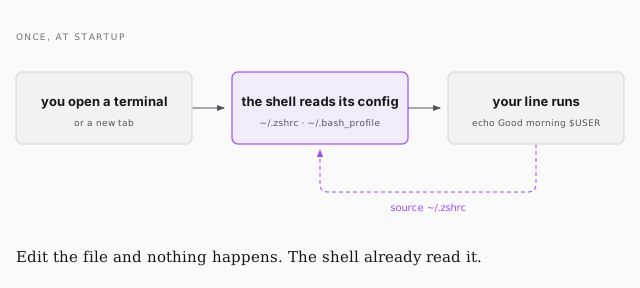
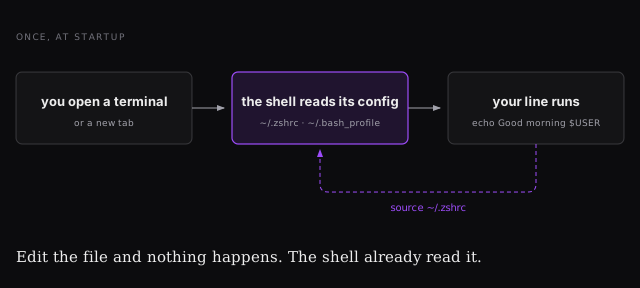
source ~/.zshrc
You will hit this. You'll change something, see no effect, and assume you got the syntax wrong. Usually you just haven't reloaded.
The exercise
Open your shell config and add a line that makes it greet you:
echo Good morning $USER
Open a new tab and it greets you. That's the whole trick — and the point isn't the greeting, it's that a shell config is just commands that run on every new terminal. Check your mail, print the weather, list your open PRs. Anything you can type, you can have run automatically.
Going deeper is its own rabbit hole: oh-my-zsh is a popular default setup with good colours and sane defaults out of the box, and there's a whole Introduction to Bash, VIM & Regex course if you want it.