
Redirects, gzip and subdomains
tl;dr
Compression is re-description, not deletion — which is why gzipping a JPEG does nothing. And a subdomain is one A record plus one more nginx server block.
Three small nginx capabilities that each explain something larger.
Redirects
A location block can send a path somewhere else entirely:
location /help {
    return 301 https://developer.mozilla.org/;
}
Nothing deep, but useful — and it's the same block structure you already know.
gzip, and what compression actually is
nginx compresses responses before sending them, and the browser unpacks them. It's one of the few things browsers do natively, and it's why pages weigh a fraction of their source size over the wire.


Every file is ones and zeros. A compression algorithm writes the same information a shorter way — four zeros, three ones, one zero — and the unpacking is exact. A gigabyte becomes megabytes purely by describing it better.
The setting lives in /etc/nginx/nginx.conf, on a scale to 9. The default of
6 is the right answer. Turning it up costs CPU on every single connection, in
both directions, for a marginal gain — that's a trade you make deliberately, not
by default.
And the fun consequence: you cannot usefully gzip a JPEG. It's already compressed. Same reason a bitmap is 5 MB and the identical PNG is 30 KB — PNG, JPEG and MP3 are all compression algorithms, some lossy, some not.
Subdomains
dev. and blog. are how real work happens — a subset of your domain, sharing
cookies and certificates, without registering anything new.
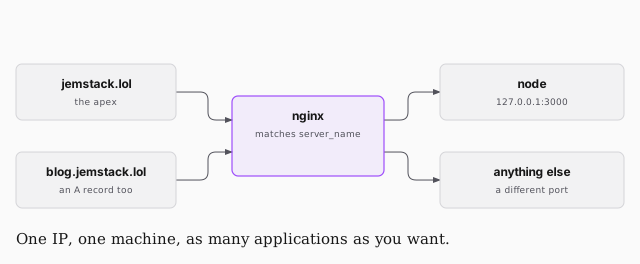
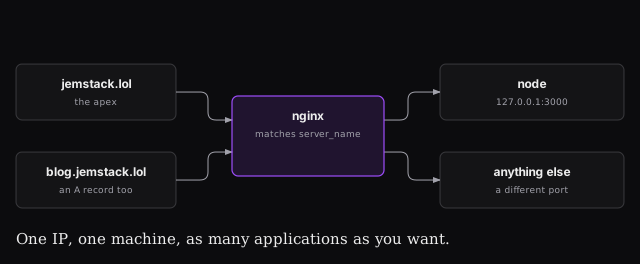
Two steps. First an A record for blog at your registrar, pointing at the
same droplet IP. Then a second server block:
sudo vi /etc/nginx/sites-enabled/blog.jemstack.lol
server {
    listen 80;
    listen [::]:80;
    server_name blog.jemstack.lol;
    location / {
        proxy_pass http://localhost:3000;
    }
}
server_name is the whole mechanism here. Both hostnames resolve to one IP
and arrive at one nginx; the name in the request is what tells them apart. On
your default server it didn't matter — this is where it starts to.
Then the two steps that are easy to forget:
# add the include line to /etc/nginx/nginx.conf
sudo nginx -t
sudo service nginx restart
You pointed nginx at your one config file explicitly back in the setup lesson,
so a new file in sites-enabled is invisible until you include it. And a daemon
reads its config once — no restart, no change.
That's the whole loop, and by now every line of it should be legible: registrar, nameserver, A record, nginx server block, proxy_pass, restart.