
Reading logs, and why commands compose
tl;dr
Every command has the same three connections — in, out, error — which is the entire reason you can chain any two together. Then `find` for where things are and `grep` for what's inside them.
If it isn't logged, you're guessing. The cron job in the last lesson ran happily and produced nothing visible until it was told where to write.
Logs live in /var/log — by convention, not by law, and the convention is
worth keeping. The three you'll open most: syslog for the system, auth.log
for login attempts, and nginx's own.
cat | dump the whole file — fine until the file is large |
less | a page at a time |
head | the beginning |
tail -f | the end, and follow it live |
tail -f is the one. Watching a log as things happen is how you debug a server.
The idea underneath everything
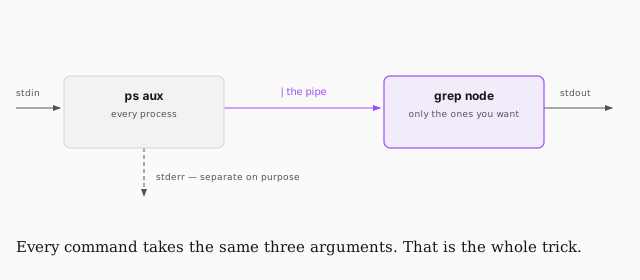
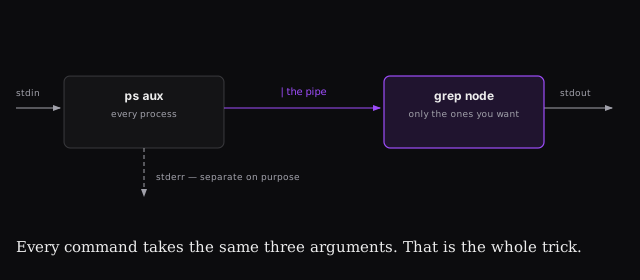
POSIX — the portable operating system interface — gives every command the same three connections: standard in, standard out, standard error.
Sit with what that means. Every command ever written takes the same arguments and produces the same shape of output. So any command can feed any other command, forever, without either one knowing the other exists.
That's why people who are good at the shell produce those improbable one-liners that pull exactly the right lines out of a gigabyte of logs. It isn't cleverness so much as leverage — the interface has been the same since 1988.
Redirection
| | pipe — send stdout into the next command |
> | write to a file, overwriting it |
>> | write to a file, appending |
< | read from a file into the command |
2>&1 | send stderr into stdout, so both go the same way |
echo hello > foo      # foo now says hello
echo hola > foo       # foo now says hola — you just lost hello
echo hola >> foo      # this is the one you want for logs
The single arrow overwrites. That's the mistake, and it's silent.
Finding things
find is where. grep is what's inside.
sudo find /var/log -type f -name "*.log"    # files named *.log
sudo find / -type d -name log               # directories called log
-type f for files, -type d for directories. It's read-only — you cannot
break anything experimenting.
Then grep, which is the one you'll reach for constantly:
ps aux                  # every process — unreadable
ps aux | grep node      # the one you wanted
That pipe-into-grep pattern is most of practical shell work. zgrep does the
same inside compressed files without unzipping them first.