
Proxying to Node, and keeping it alive
tl;dr
A virtual server block hands every request to Node on port 3000. Then pm2 keeps the process running after you close the shell — because `node app.js` dies with your terminal.
Get a current Node
apt install nodejs gives you something ancient. Pull the real source first:
curl https://deb.nodesource.com/setup_19.x | sudo -E bash -
sudo apt-get install nodejs
node --version
Stop needing sudo for your own files
/var/www isn't yours, which is why the earlier vi trap happened. Take it:
sudo chown -R $USER:$USER /var/www    # change owner, recursively
mkdir /var/www/app && cd /var/www/app
git init
npm init
touch app.js
The application
This time write straight to the response instead of reading a file:
const http = require("http")

http.createServer(function (req, res) {
    res.write("On the way to being a full stack engineer")
    res.end()
}).listen(3000)

console.log("server started")
res.end() isn't optional. Without it the server never signals that the
response is finished, so nothing is sent.
The virtual server
nginx can host any number of virtual servers on one machine. Rather than editing the default config, make your own:
sudo vi /etc/nginx/sites-enabled/fsfe
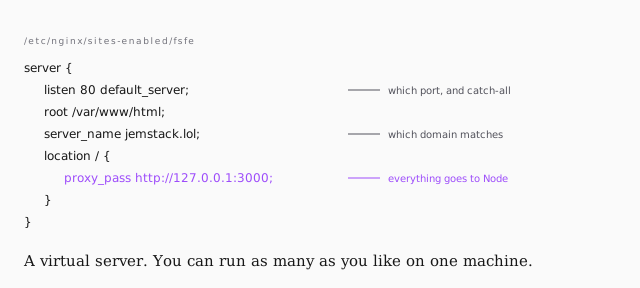
server_name doesn't matter while this is the catch-all, but it will the moment
you add subdomains — that's what nginx matches the incoming request against.
Then point nginx at only this file: edit /etc/nginx/nginx.conf and remove the
line including sites-enabled/default, so you're not fighting the default
config later.
sudo nginx -t                 # validate before you break anything
sudo service nginx restart
nginx -t checks every config file without applying it. Run it every time. It
needs sudo because it touches the log files.
Keep it running
Start the app and it works. Close your terminal and the site goes down — the shell exits and takes the process with it.
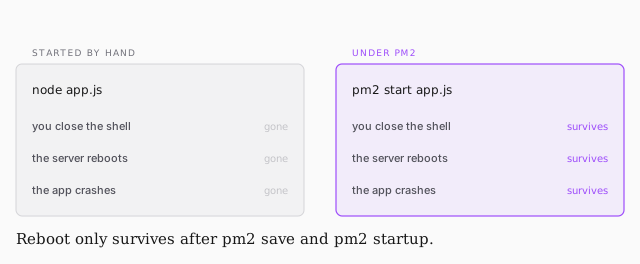
sudo npm i -g pm2
pm2 start app.js --watch
pm2 list
pm2 save                      # remember the current process list
pm2 startup                   # prints a command — run it, it registers with systemd
That's the whole chain: a domain, a server you hardened yourself, nginx in
front, Node behind it, kept alive across reboots. From here it's npm install
and territory you already know.