
Orchestration and load balancing
tl;dr
Two containers is manual; thousands is Kubernetes. And nginx balances across them with an `upstream` block and one changed line.
You made two containers by hand. Now imagine thousands — brought up, upgraded, taken down. That's orchestration, and it's a full-time job for people.
Kubernetes is the name you've heard, and that's what it does: manages your containers. Docker Swarm and Apache Mesos do the same thing. None of them are worth standing up for two containers on one droplet.
Balancing across them
Two servers where all the traffic hits one is pointless. A load balancer distributes requests, and nginx already is one.
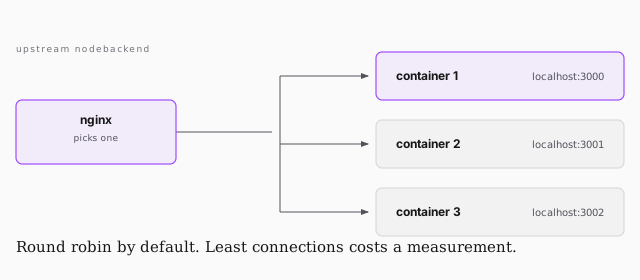
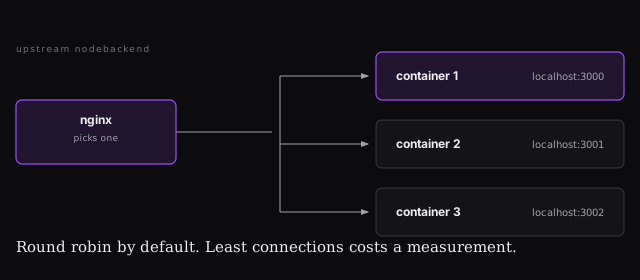
In /etc/nginx/nginx.conf, inside the http block:
upstream nodebackend {
    server localhost:3000;
    server localhost:3001;
}
Then in your server block, change one line:
proxy_pass http://nodebackend;
Instead of naming a port, you name a cluster, and nginx decides.
Which one gets it
| round robin | 1, 2, 3, 1, 2, 3. The default |
| IP hash | this address block always goes to that server |
| least connections | the least busy — but you have to count connections |
| least load | the least loaded — but you have to measure load |
Every clever algorithm costs a measurement. There's a neat middle ground raised in the room: sample two servers at random and pick the better one. You get a surprisingly even distribution while inspecting two machines instead of a thousand.
Prove it's balancing
Add a log format that records the upstream, point access_log at it, then:
sudo tail -f /var/log/nginx/access.log
Refresh a few times and you'll watch requests alternate between 3000 and 3001. Believing it is fine. Watching it is better.