
nginx, and why it sits in front
tl;dr
A web server takes an incoming request and decides where it goes. nginx is written in C, does compression, SSL and load balancing as its day job, and will always be faster at this than Node.
Your server is updated, hardened, and still answers nothing. It needs a web server: the thing that takes a request off the wire and decides where it goes — an application, a database, another machine entirely.
Two serious options. Apache has deep built-ins and works well with Java and PHP out of the box. nginx — pronounced engine-x, which nobody guesses the first time — is a web server, a reverse proxy, a forward proxy, an email proxy, and it's written in C.
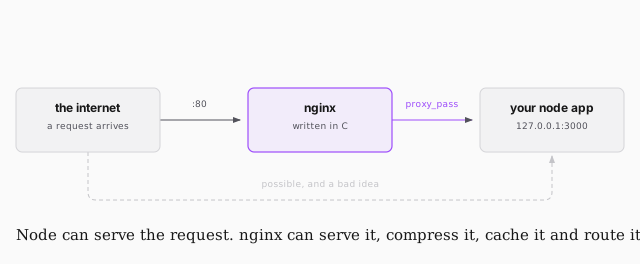
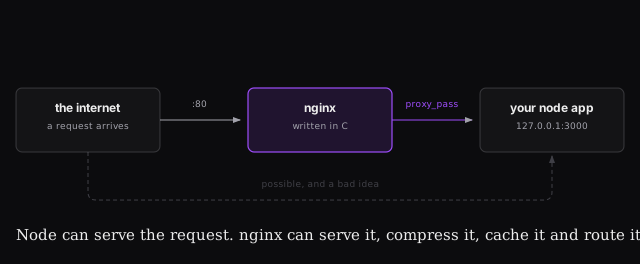
The obvious question is why bother, since Node can serve the request itself.
- Speed. C against a JavaScript runtime, at the one job nginx exists to do.
- Everything else. Compression, HTTP/2, SSL certificates, logging, load balancing. All of it is nginx's bread and butter and all of it is a miserable afternoon in Node.
- One place to route. The moment you have a Node service and a Python service, something has to decide which gets the request. Better a centralised router than routing logic scattered across applications.
Install and look at it
sudo apt install nginx
sudo service nginx start
Visit your IP and you'll get the nginx welcome page. Then go read the default config, which lives where all config lives:
less /etc/nginx/sites-available/default
nginx configs are their own small language, and every line has a reason. The pieces worth recognising now:
root | the base directory requests are served from — /var/www/html |
location | a path block. / is the root, like a filesystem |
| directives | the instructions inside a block, e.g. try_files, proxy_pass |
Make it yours
That welcome page is just a file. Replace it:
sudo vi /var/www/html/index.html
nginx picks up index.html before the Debian default, so hello world is
enough. If a static page is all you need, you are already finished — nginx
serves HTML perfectly well on its own.
Next: putting a Node application behind it.