
HTTP, status codes, and HTTPS
tl;dr
Headers are just metadata, status codes group by their first digit, and certbot turns HTTPS from an afternoon of certificate wrangling into one command.
HTTP is two halves: the request going up, the response coming back.
GET / HTTP/1.1
Host: jemyoung.com
User-Agent: Mozilla/5.0 (Macintosh...) Chrome/110
Accept-Encoding: gzip, br
Accept-Language: en-US
Cookie: session=...
Everything after the first line is headers — key/value pairs carrying
information about the exchange. A cookie is just a header. So is
Accept-Encoding: gzip, br, which is the browser saying I can unpack gzip, and
Brotli too if you have it, which is precisely how the gzip you configured
earlier gets negotiated.
The ones worth recognising: User-Agent (who's asking, and what they support),
Accept-Language (how you decide which translations to send), Content-Type,
Set-Cookie. Anything you invent yourself gets an X- prefix so it can't
collide with a standard one.
The response is usually shorter — a status, a couple of headers, the body.
Status codes
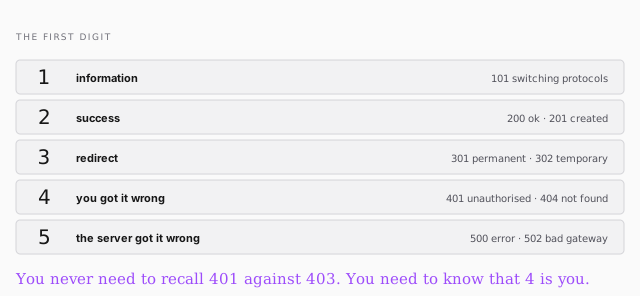
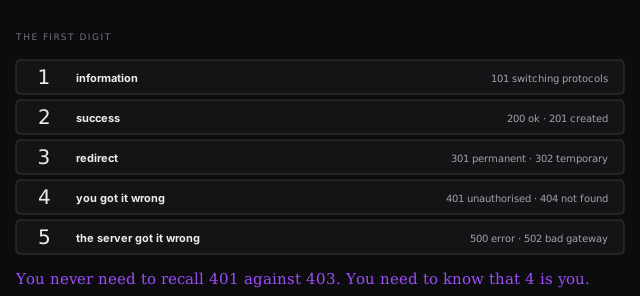
This is the useful shape. You don't memorise the difference between 401 and
403; you read the first digit and you already know who's at fault.
And they carry real diagnostic weight. When nginx was up but the Node app
wasn't, the answer was 502, not 500 — which told you the droplet was
alive, nginx was alive, and the thing behind it wasn't. That's a lot of
information for three characters.
Encrypt it
Your traffic currently crosses those twenty hops in the clear. Anyone misconfigured in the middle can read it — a man-in-the-middle attack, which in the early internet was trivial because nothing was encrypted, credit cards included.
HTTPS encrypts the connection. Server and browser negotiate keys, and everyone in between sees gibberish — the same public-key idea as your SSH keys. Modern browsers now warn on anything else, and Web Bluetooth, service workers and much else simply refuse to run without it.
certbot
Registrars will happily sell you a certificate. certbot gives you one free, from the Electronic Frontier Foundation.
sudo snap install core; sudo snap refresh core
sudo apt-get remove certbot            # in case an old one is around
sudo snap install --classic certbot
sudo ln -s /snap/bin/certbot /usr/bin/certbot
sudo certbot --nginx
snap is another package manager — less reliable than apt, used here because
it's what certbot ships through. ln -s makes a symbolic link, the Unix
shortcut, so certbot is on your path.
Then --nginx does the work: it reads your config, finds every server block
including your subdomain, gets certificates for all of them, and rewrites the
config to serve on 443 and redirect 80. Go read the file afterwards — seeing
what it changed is the point.
sudo ufw allow https # 443