
How the internet works, and how to see it
tl;dr
A network of networks held together by cooperation and rules. Your request crosses your router, your ISP, a backbone, a data centre and a load balancer — and `traceroute` will show you every hop.
"How does the internet work" is Jem's favourite interview question, and not because there's a right answer. It's freeform on purpose: you can shine on any part of the stack, and what it really measures is how curious you've been about the ecosystem you work inside.
The honest framing: the internet is a network of networks, built on cooperation and rules. Nobody made Ubuntu implement SSH and then made macOS implement it compatibly. People agreed on a standard and implemented it. DARPA started something loose so some universities could talk; what exists now is the result of no single company or person.
What your request actually crosses
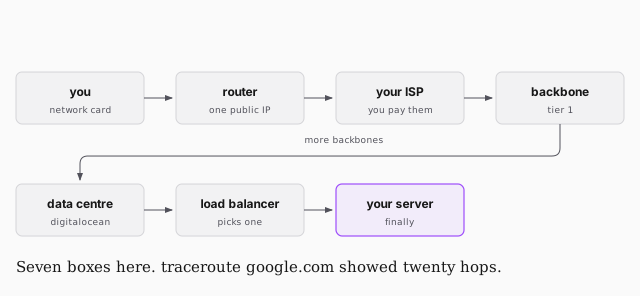
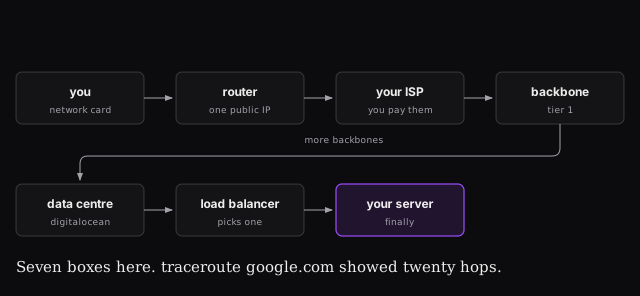
Every computer needs a network card — built in now, an external modem once. Your router is what lets many machines behind one public address. Your ISP connects up to a Tier 1 provider: these are the backbones, they run at 100 Gb/s as a minimum, and when one is misconfigured you feel it.
From there: a data centre, a load balancer so you don't slam one machine, and finally the server.
Go and look
The point of the tools is that none of this has to be taken on faith.
ping google.com | is the host up? The fastest way to tell whether it's your network or the site |
traceroute google.com | every hop between you and the destination, with timings |
netstat -lt | less | every open port and connection on your own machine |
traceroute is the one worth running now. You'll see your local 192.168.x.x,
then your router, then your ISP, then hop after hop across backbones, then
addresses that start clustering into one block — that's the destination's data
centre — and finally the load balancer serving the site.
It's also a debugging tool: when something is unreachable, traceroute shows you where it stops. Often the answer is "not your fault".
Words that come up
- Internet — the network of networks.
- Intranet — a private one. Most large companies have one, connected to the outside but not open to it, via firewalls and VPNs.
- LAN / WAN — local and wide area networks. If you remember LAN parties, the appeal was zero latency.
- IP — Internet Protocol. Rules for what an address is.
An IP address labels any connected device. Blocks of them are owned:
Cloudflare has 1.1.1.1 and the block around it, Google and Amazon own blocks,
the US government owns one of the largest. An open network that is also, in
parts, property.
IPv4 gives four blocks — about 4.3 billion addresses. In the 1980s that seemed absurd. We ran out years ago. IPv6 is 128 bits instead of 32, which is 340 undecillion addresses, and this time it probably is enough.