
Firewalls with ufw, and staying patched
tl;dr
Three commands close everything you didn't ask for. Allow SSH *before* you enable it, prefer silent drops to polite refusals, and let unattended-upgrades handle the patching.
A firewall applies rules to incoming traffic: allowed, not allowed. That's the
whole idea, and it used to be genuinely hard — iptables, long esoteric
commands, easy to get wrong.
Ubuntu ships ufw, the uncomplicated firewall, and it lives up to the name.
sudo ufw status              # disabled, most likely
sudo ufw allow ssh           # port 22
sudo ufw allow http          # port 80
sudo ufw enable
sudo ufw status              # confirm
Why not https yet? Because you haven't set it up. No certificate, nothing
configured in nginx — opening 443 now would be a hole for no benefit. It comes
later.
Notice what you didn't do: close port 3000. You didn't have to. ufw's default is to deny anything you haven't allowed, so the scan that showed 3000 open now shows it closed.
deny and reject are not the same
Both refuse traffic. They differ in whether they say so.
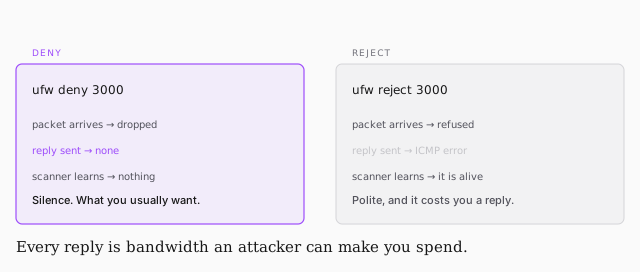
deny drops the packet silently. Nothing goes back, so a scanner can't
distinguish your server from empty space, and you spend nothing answering.
reject sends an ICMP error. Polite, and occasionally what you want when
you're deliberately telling a known client the door is closed. But every reply
is a packet you were made to send — and that connects back to the
amplification attacks from the ICMP lesson. Enough rejections and answering them
becomes the attack.
Default to deny.
Stop patching by hand
The third defence, automated:
sudo apt install unattended-upgrades
sudo dpkg-reconfigure unattended-upgrades
Say yes to automatic stable updates. It runs at low priority — in the background, when the system isn't busy.
Stable is the operative word: this pulls the well-tested updates, not the bleeding edge, which is the same LTS reasoning from when you picked the OS. On a server you want the boring version.
Before this existed you'd have written a cron job to do it, which is the next section's subject anyway.