
Databases, and SQLite
tl;dr
A file doesn't scale past one machine and has no structure anyone agrees on. Relational databases fix both, foreign keys are the whole trick, and SQLite needs no server at all.
Why not just save everything to a file?
- It doesn't scale. A file lives on one disk. Two servers, and it's over.
- It has no structure. Your idea of how to lay out that file and mine differ, and nothing enforces either.
- You'd read the whole thing to find one row.
Jem's CS professor told him 90% of a career is reading and writing databases. Look at what you actually do all day: read from an API, write to an API — and behind those, a database.
Two families
Relational — MySQL, Postgres, SQLite, SQL Server, and IndexedDB in your
browser. Strict, structured, opinionated about where data goes.
Non-relational — NoSQL. Also structured, much more loosely. Faster, since there's less to enforce on every query.
The analogy that makes it click: relational is to NoSQL what TypeScript is to JavaScript. Stricter, noisier, refuses things you wanted to do — and sometimes that's exactly what you needed.
Tables, keys, and the actual trick
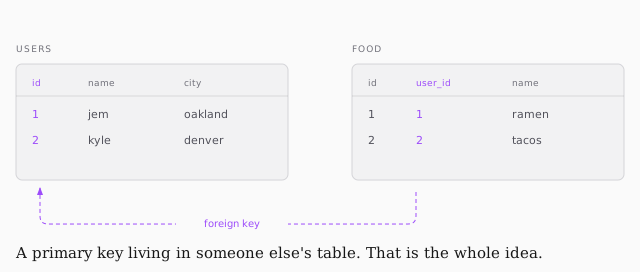
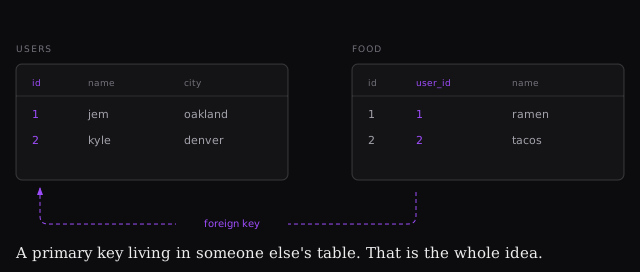
Tables have fields (columns) and records (rows). Every table has a primary key — unique per row, usually an incrementing number.
That same key stored in a different table is a foreign key, and that's
where "relational" comes from. The food table can't tell you whose favourite it
is; the user_id in it points back to the users table, which can.
SELECT * FROM users WHERE name = 'jem';

SELECT users.name, food.name
FROM food
LEFT JOIN users ON food.user_id = users.id
WHERE food.name = 'ramen';
* is the wildcard. A JOIN stitches two tables into one result — and joins
are where SQL stops being obvious, so that's a rabbit hole for another day.
SQLite
Every other database is a separate service to install, configure, password and maintain. SQLite attaches to your application. Not the fastest, not the most powerful, and probably the most-deployed database on earth because it runs anywhere.
npm i sqlite3
const sqlite3 = require("sqlite3")
const db = new sqlite3.Database(":memory:")

db.serialize(() => {
    db.run(`CREATE TABLE visitors (
        count INTEGER,
        time TEXT
    )`)
})
:memory: keeps it in RAM — swap in ./app.db for a file on disk. serialize
guarantees the table exists before any query runs against it.