
Containers, and Docker
tl;dr
Virtualization slices a machine; containerization slices an application. Each piece gets its own tiny OS, so you can replace half of them while the other half keeps serving.
A monolith is one repo, one language, one deploy. Everyone knows what everyone else is doing because you're all in the same file system.
Microservices are loosely connected services. You write React, someone else writes Angular, someone else writes Groovy, and none of you have to agree on anything — until you do, because coordination is the entire cost. Different languages, different opinions about what an API should look like, and now they have to talk.
Neither wins. Netflix runs on microservices; the demo of their service graph is an unreadable hairball, and the part one team owns is a speck in it.
Containerization
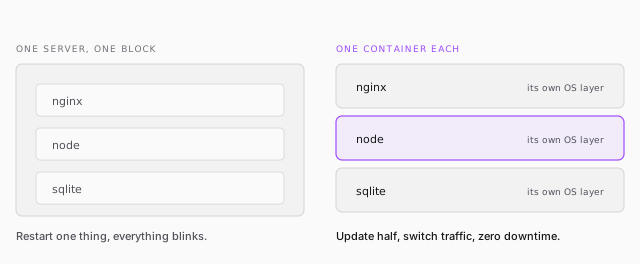
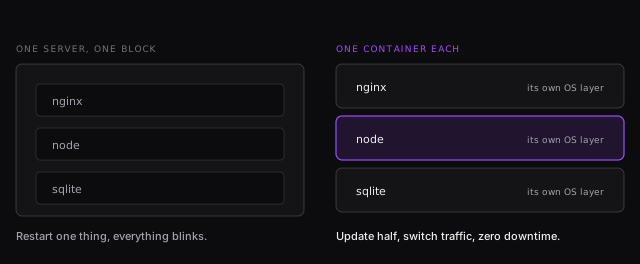
Virtualization slices a machine into VPSs — you did that when you bought the droplet. Containerization goes further and slices the application: nginx in one container, Node in another, the database in a third.
The payoff is deployment. Update half your containers while the other half keep answering, then switch traffic across. Zero downtime, which is a genuinely recent idea, and the reason containers plus virtualization are the foundation of cloud computing.
A Dockerfile
FROM node:19-alpine3.16

RUN mkdir -p /home/node/app/node_modules \
    && chown -R node:node /home/node/app

WORKDIR /home/node/app

COPY package*.json ./
USER node
RUN npm install
COPY --chown=node:node . .

EXPOSE 3000
CMD [ "node", "index-ws.js" ]
Line by line, because every one earns its place:
FROM— there's always an OS in there somewhere. Alpine is a deliberately tiny Linux that exists to run one application and nothing else. Node maintains this image, so you're not building it.RUN mkdir/chown— the image runs as a user callednode, not root. That directory has to exist and belong to it.COPY package*.jsonbefore the rest — so thenpm installlayer is cached and doesn't re-run every time your source changes.EXPOSE— the one port that gets out.
docker build -t myapp .
docker run -p 3000:3000 -d myapp
docker run -p 3001:3000 -d myapp     # a second instance, different host port
Docker Hub is GitHub for images: push yours, and anyone can pull and run it. That's the part that makes containers feel like magic the first time.