
A fake CI/CD pipeline with cron
tl;dr
Continuous integration is small merges and constant testing. Delivery and deployment differ by one thing: whether a person presses the button. And a two-line shell script plus cron makes a pipeline you shouldn't ship.
CI/CD looks like someone else's problem until you have more than one developer. One person on one server doesn't need it. A hundred people shipping features simultaneously do — otherwise it's everyone pushing whatever, one enormous merge on Friday, and hope.
Three terms, one real distinction
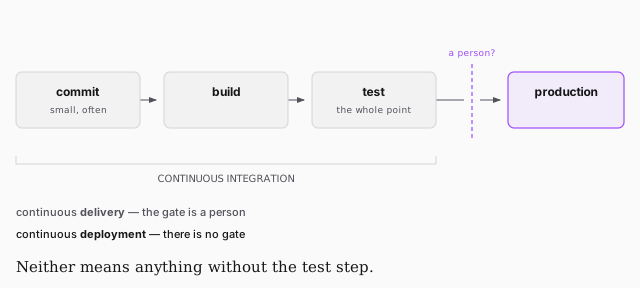
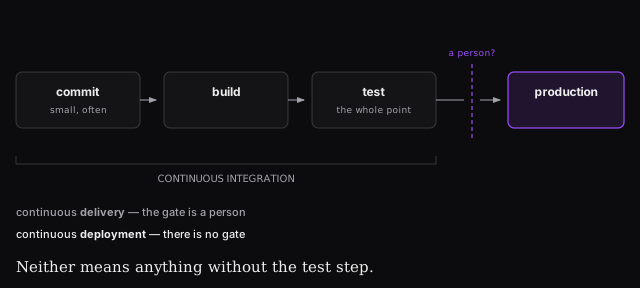
Continuous integration is merging validated changes back to main as often as
possible. Small atomic commits, not a branch you've held open for two weeks with
fifty thousand lines in it. If you've never had to git bisect a production
system, that's the thing CI is protecting you from.
Continuous delivery means changes are tested and ready to ship. Continuous deployment means they actually ship. Same pipeline; the difference is whether a human approves the last step — and that's a business decision. Healthcare software wants a person there. A marketing site doesn't.
Real setups use real tooling — Netflix runs on Spinnaker, which can stand up 500 correctly-configured, load-balanced clusters from a button. That is a Ferrari for mowing a lawn this size.
All you actually need is a stopwatch
cron runs a thing on an interval. That's it. Point it at a script that pulls from GitHub and you have a pipeline — a bad one, with no tests, which is why Jem calls it fake CI/CD and says plainly not to ship it.
The script
which bash                      # find the interpreter first
vi github.sh
#!/usr/bin/bash
cd /var/www/app
git pull --ff-only origin main
chmod 700 github.sh # nothing is executable by default
Two lines of substance. #! — the hashbang — names the interpreter. --ff-only
takes changes that fast-forward cleanly and refuses anything that would need a
rebase, which is what you want from a script running unattended.
The schedule
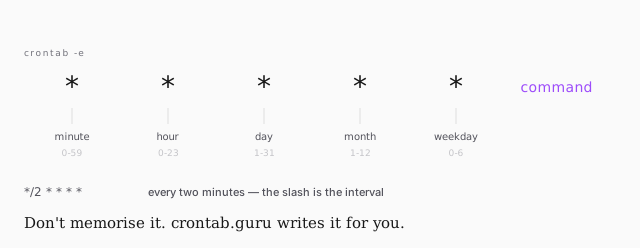
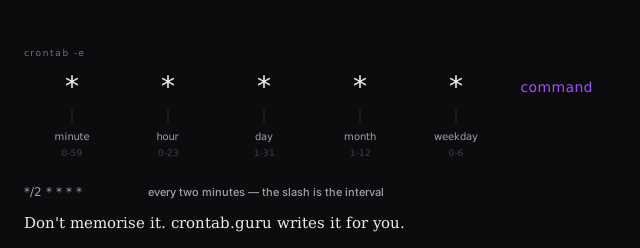
crontab -e
*/2 * * * * sh /var/www/app/github.sh 2>&1 | logger -t github.sh
That tail matters. Without it the output goes nowhere — the job runs, and
you can't tell. 2>&1 merges standard error into standard out, logger writes
it to syslog, and -t tags the entries so you can find them.
sudo tail -f /var/log/syslog
Now pushing to GitHub from your laptop lands on the server within two minutes, and you never open an editor over SSH again.